Designing an Efficient Storage Room Layout (Step by Step)
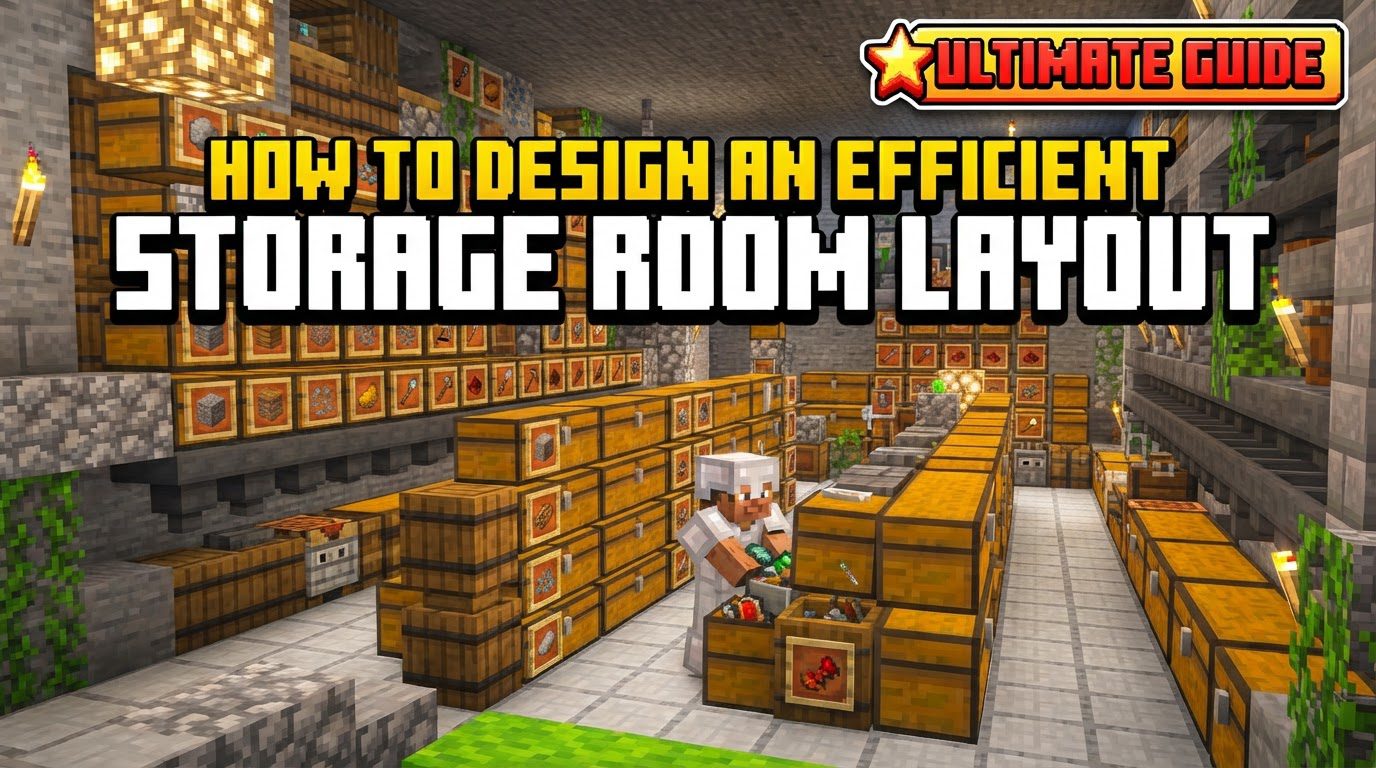
Building an efficient storage room is a cornerstone of any successful Minecraft experience. As you gather more resources and delve deeper into the game’s mechanics, the sheer volume of items you accumulate can quickly become overwhelming. A well-designed storage system not only saves you time and frustration but also enhances your overall gameplay by keeping your valuable resources organized and easily accessible. This guide will walk you through the essential components, a step-by-step design process, crucial tips, and common pitfalls to avoid, ensuring your storage solution is as effective and expansive as your adventures.
Understanding Key Storage Mechanics
Before embarking on the design of your storage room, it is vital to understand the fundamental blocks and mechanics that form the backbone of any efficient system.
- Chests: These are the most basic and common storage blocks in Minecraft. A single chest provides 27 inventory slots for items. When two chests are placed adjacent to each other, they merge to form a large chest, effectively doubling the storage capacity to 54 slots. Chests require an air block directly above them to be opened, which is an important consideration for layout.
- Barrels: Barrels offer an identical 27 inventory slots to a single chest. Their key advantage lies in their ability to be opened even when a solid block is placed directly above them. This unique property makes barrels exceptionally space-efficient, allowing for compact vertical designs where chests might not fit.
- Shulker Boxes: These highly versatile items act as portable chests. When a shulker box is broken, it retains all of its contents, making it invaluable for transporting large quantities of items. Furthermore, shulker boxes can be stored inside other chests or barrels, allowing for an incredible level of consolidated storage, where an entire inventory of items can be contained within a single slot.
- Hoppers: Hoppers are crucial components for any automated storage system. They are designed to pick up items from the world or from an inventory above them and move them into an inventory below or to their side. Their ability to transfer items automatically is central to creating sorting mechanisms.
- Redstone: The magical dust of Minecraft engineering, Redstone is essential for building automatic sorting systems. It allows you to create circuits that detect items, activate hoppers, and direct items to specific categorized chests, transforming manual sorting into a seamless, automated process.
- Item Frames: These decorative blocks are invaluable for visual organization. By placing an item frame on or directly above a chest or barrel and then placing an item within the frame, you can visually label the contents of that storage unit. This allows for quick identification of stored goods without needing to open every container.
- Categorization: This is a conceptual mechanic, but perhaps the most important. Categorization involves grouping similar items together, such as all types of wood, different ores, various food items, or building blocks. A well-thought-out categorization system is the foundation of an easily navigable and efficient storage room.
- Lighting: Proper illumination within your storage area is not just for aesthetics; it’s a critical safety measure. Adequate lighting prevents hostile mobs from spawning, ensuring that your storage room remains a safe and peaceful place to organize your inventory.
Step-by-Step Design Process
Designing an efficient storage room is a systematic process. Following these steps will help you create a functional and organized space tailored to your needs.
- Assess Needs: Begin by evaluating the types of items you frequently collect and the quantities you expect to store. Are you a miner, a farmer, a builder, or an explorer? This assessment will help you estimate the overall storage capacity required and the number of categories you’ll need.
- Categorize Items: Before laying down a single block, spend time logically grouping your items. Common categories include building blocks (stone, wood, dirt), raw resources (ores, unrefined materials), tools and armor, food items, mob drops, redstone components, and more. A clear categorization scheme is the blueprint for your layout.
- Choose a Layout: Based on your needs and available space, decide on a layout. Options range from simple grid layouts of chests, ideal for smaller bases, to vertical storage solutions that maximize floor space, or more complex automated systems that offer peak efficiency but require more planning and resources.
- Allocate Space: Ensure you have enough physical space for your chosen layout. This includes not only the footprint for chests and barrels but also sufficient access pathways, walking areas, and, if you plan for automation, dedicated space for Redstone mechanisms and hopper lines. Future expansion should also be considered at this stage.
- Build Structure: Construct the physical room. Consider its overall size, potential for expandability, and its proximity to other essential areas like your main base, crafting stations, and resource collection points. A storage room located far from your primary activities will inevitably be less efficient.
- Implement Storage Blocks: Place your chests, barrels, and shulker boxes according to your chosen categorization. Grouping containers for similar items together will make retrieval much faster. Utilize barrels where verticality or tight spaces are a concern.
- Label Contents: Once your storage blocks are in place, clearly label what each chest or barrel contains. Item frames are excellent for visual cues, displaying an example of the item stored within. For more detailed descriptions, signs can be placed above or next to the containers.
- Integrate Automation (Optional): If you’re ready to take your storage to the next level, build auto-sorters using hoppers and Redstone. These systems automatically direct incoming items to their designated categorized chests, significantly reducing the time spent on manual sorting, especially after large resource gathering trips.
Important Tips for Efficiency
Beyond the basic steps, several tips can further refine your storage room’s efficiency and user-friendliness.
- Vary Storage Types: Don’t limit yourself to just chests. Utilize chests for general bulk storage, barrels for compact vertical stacks or areas where space above is limited, and shulker boxes for consolidating items within other storage units or for portable inventory management. This variety optimizes space and accessibility.
- Keep Work Blocks Nearby: For streamlined resource management, place essential work blocks like crafting tables, furnaces, blast furnaces, smokers, anvils, and grindstones in close proximity to your storage room. This minimizes travel time between crafting and retrieving materials.
- Leave Room for Expansion: Minecraft worlds are ever-growing, and so will your item collection. Always design your storage room with future growth in mind, leaving space to add more chests, barrels, or even entire new sorting modules as your needs evolve. This prevents the need for a complete overhaul later on.
- Consider Vertical Storage: To maximize space efficiency, especially in confined areas, stack chests or barrels in multiple layers. You can use ladders or trapdoors for easy access to higher levels, turning a small footprint into a high-capacity storage solution.
- Automate Where Possible: Redstone-based auto-sorters are a game-changer for large-scale operations. While they require an initial investment of time and resources, the time saved in automatically organizing items, particularly after extensive mining or farming sessions, is immeasurable.
- Regular Sorting and Cleaning: Even with the best system, clutter can accumulate. Periodically review your storage. Purge unnecessary items, consolidate half-stacks, and re-evaluate your categories to maintain efficiency and prevent your system from becoming overwhelmed.
- Use Beacons (Late Game): In the late game, a beacon placed strategically within or near your storage room can provide beneficial effects like Haste or Speed. Haste will allow you to break blocks faster (useful for quick modifications), and Speed will allow you to navigate your large storage area more quickly, significantly improving workflow.
- Hidden Storage: For highly valuable or sentimental items, consider incorporating secret areas. These can be concealed behind illusionary blocks, accessible via hidden Redstone mechanisms, or simply tucked away in an inconspicuous corner, adding a layer of security, especially in multiplayer worlds.
Common Mistakes to Avoid
Even experienced players can fall into common traps when designing storage. Being aware of these pitfalls can save you a lot of headaches.
- Not Enough Space: One of the most frequent mistakes is underestimating the sheer volume of items you will collect. A cramped storage room quickly becomes inefficient, requiring constant reorganization and leading to items being strewn about. Always build larger than you initially think you’ll need.
- Poor Organization: A lack of clear categorization from the outset will lead to endless frustration. If items are stored haphazardly, finding specific resources becomes a time-consuming chore, defeating the purpose of an organized system.
- Ignoring Block Placement: Forgetting that chests require an air block directly above them to open is a common oversight. Placing solid blocks directly above chests will prevent access, forcing you to break and replace blocks, which is inconvenient and inefficient. Barrels are the exception to this rule.
- Lack of Labeling: Failing to label your chests or barrels with item frames or signs will result in constantly opening multiple containers to find what you need. This wastes valuable time and makes your storage system much less user-friendly.
- Excessive Hoppers: While useful for automation, an overabundance of hoppers, especially those constantly trying to move items that aren’t there, can cause significant game lag. Design automated systems with efficiency in mind, using hoppers judiciously to minimize their impact on game performance.
- Neglecting Security (Multiplayer): In multiplayer environments, failing to protect valuable items in your storage can lead to theft. Consider using locked chests (if a server plugin allows), hidden storage, or simply building your storage in a secure, private location.
Tags:
YOU MAY ALSO LIKE...