

Crafting a Copper Chest Using the Iron Chests Mod
The world of Minecraft, while vast and resource-rich, often presents players with a recurring challenge: managing an ever-growing inventory. As adventurers delve deeper into caves, build grand structures, and farm abundant resources, the standard 27-slot vanilla chest quickly proves insufficient. This is where the Iron Chests mod becomes an indispensable addition, revolutionizing storage solutions and offering a tiered system of chests with significantly increased capacities. Among these, the Copper Chest stands out as an early and highly accessible upgrade, providing a substantial boost to storage space early in your Minecraft journey.
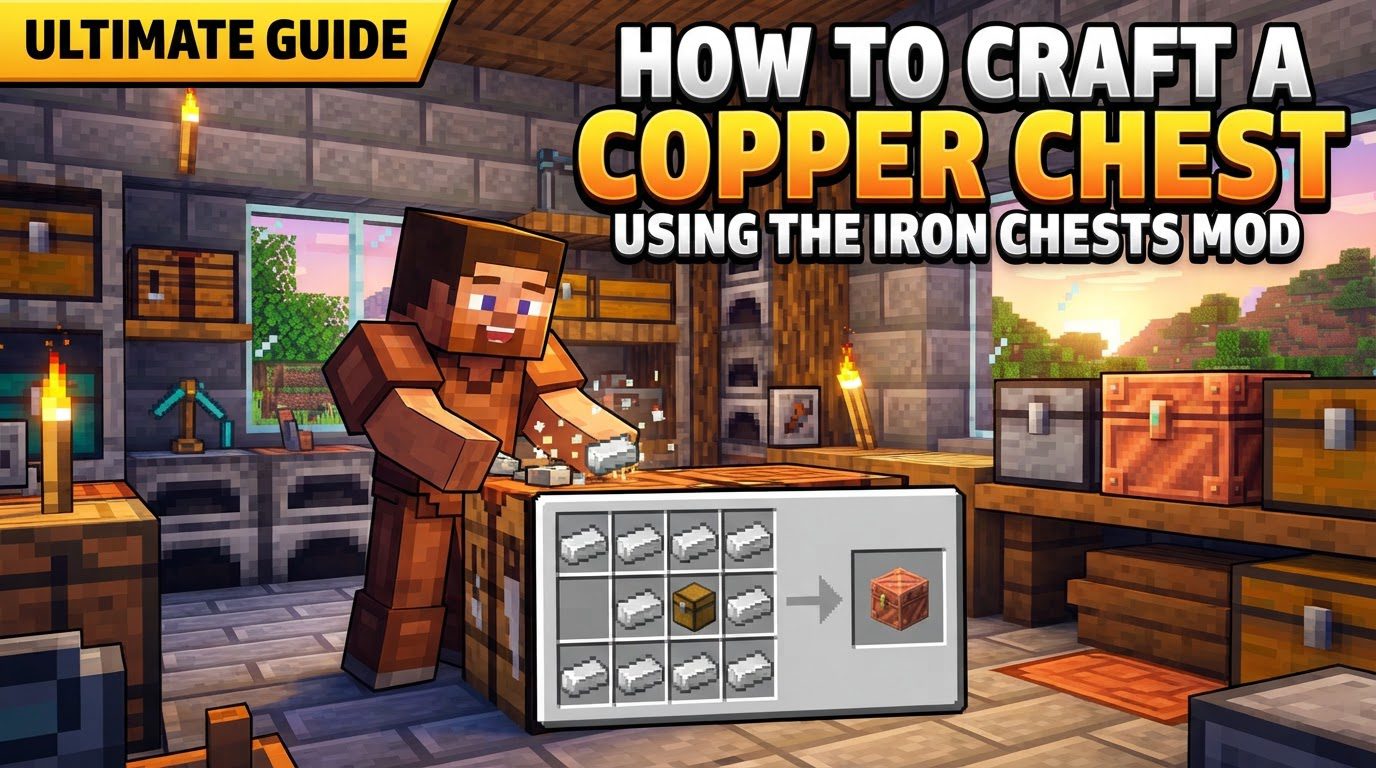
The Iron Chests mod fundamentally enhances the storage mechanic within Minecraft. Unlike the default chests that offer a mere 27 inventory slots, chests introduced by this mod provide expanded storage capabilities, allowing players to store more items in a single block. The Copper Chest, in particular, boasts a generous 45 inventory slots. This is a significant improvement over the vanilla chest, nearly doubling its capacity and making it an excellent choice for organizing early-game resources or consolidating smaller item stacks.
One crucial distinction to understand about chests from the Iron Chests mod, including the Copper Chest, is their behavior when placed adjacent to one another. Standard vanilla chests will merge into a larger, double chest when placed side-by-side, effectively combining their storage space. However, Copper Chests, and indeed all chests from the Iron Chests mod, do not exhibit this merging behavior. Each Copper Chest remains an individual storage unit, regardless of how many are placed next to it. This design choice ensures that each chest operates independently, allowing for more granular organization and preventing accidental mergers that might disrupt your storage system.
Copper Chests are typically considered the introductory tier within the Iron Chests mod’s progression system. Their relatively easy crafting recipe makes them an accessible upgrade for players who have just begun to gather basic resources. The primary material required, copper, is generally available in specific Minecraft versions, such as 1.17 and 1.18, where it was introduced as a new ore. For players on other versions, copper might still be accessible through modpacks that integrate additional mods designed to introduce this valuable material into the game world. Verifying the availability of copper in your specific Minecraft setup is a critical first step before attempting to craft a Copper Chest.
Crafting a New Copper Chest
Crafting a brand-new Copper Chest is a straightforward process that builds upon the fundamental crafting recipes of vanilla Minecraft. It requires a standard chest as a base and a sufficient quantity of copper ingots.
-
Step 1: Craft a Standard Minecraft Chest
Before you can create a Copper Chest, you will first need a basic vanilla Minecraft chest. This is one of the most common and essential crafting recipes in the game. To craft a standard chest, open your crafting table interface. Place 8 planks of any wood type (e.g., Oak Planks, Spruce Planks, Birch Planks, etc.) into the crafting grid, arranging them around the perimeter, leaving the central slot empty. This configuration will yield one vanilla chest. The type of wood used for the planks does not affect the functionality or appearance of the final Copper Chest, so feel free to use whatever wood you have in abundance.
-
Step 2: Assemble the Copper Chest Recipe
Once you have your freshly crafted vanilla chest, you are ready to upgrade it into a Copper Chest. Return to your crafting table. Place the vanilla chest you just made into the central slot of the 3×3 crafting grid. This central placement is crucial as it acts as the core component for the upgrade.
-
Step 3: Surround with Copper Ingots
With the vanilla chest occupying the central slot, you will now need to completely surround it with Copper Ingots. Place 8 Copper Ingots into the remaining eight crafting slots, filling every space around the central vanilla chest. This arrangement signifies the infusion of copper into the basic chest, transforming it into its more robust and spacious counterpart. Upon completing this recipe, a Copper Chest will appear in the output slot of your crafting table, ready to be placed and filled with your valuable items.
Upgrading an Existing Chest
In addition to crafting a new Copper Chest from scratch, the Iron Chests mod offers a convenient alternative: upgrading an existing vanilla chest in the game world. This method is particularly useful if you have already organized your items into vanilla chests and wish to enhance their capacity without having to break them, move their contents, and then replace them.
-
Step 1: Obtain a “Normal Chest to Copper Chest Upgrade” Item
To upgrade an existing chest, you will need a specific item known as a “Normal Chest to Copper Chest Upgrade.” While the precise crafting recipe for this upgrade item is not detailed, it is an integral component within the Iron Chests mod’s system for tier progression. Players typically acquire these upgrade items through crafting or by finding them as loot, depending on the modpack or server configurations. Ensure you have this specific upgrade item in your inventory before proceeding.
-
Step 2: Apply the Upgrade to a Vanilla Chest
Once you have the “Normal Chest to Copper Chest Upgrade” item in your hand (i.e., selected in your hotbar), locate the vanilla chest you wish to upgrade in your game world. Simply right-click on the vanilla chest with the upgrade item. Upon a successful right-click, the vanilla chest will instantly transform into a Copper Chest. A significant advantage of this upgrade method is that all items stored within the original vanilla chest will be preserved and seamlessly transferred to the newly upgraded Copper Chest. This eliminates the tedious process of emptying and refilling chests, saving you considerable time and effort in inventory management.
Important Tips for Using Copper Chests
- Utilizing Upgrade Items Preserves Contents: The ability to use upgrade items to enhance a chest’s tier without needing to break it is a core feature of the Iron Chests mod. This means that any items you have meticulously organized and stored within a vanilla chest will remain perfectly intact and will be automatically transferred to the higher-tier Copper Chest. This functionality is invaluable for maintaining organized storage systems and avoiding the hassle of item transfer.
- Resource Comparison for Crafting vs. Upgrading: While upgrading chests via specific upgrade items offers unparalleled convenience, it is worth noting that this method might, in some scenarios, require more resources compared to directly crafting a new Copper Chest. Players should evaluate their current resource availability and determine which method is more resource-efficient for their specific situation. Sometimes, having the materials for a new chest is easier than crafting or finding an upgrade item.
- Minecraft Forge Requirement: The Iron Chests mod, like most extensive Minecraft modifications, requires Minecraft Forge to function correctly. Minecraft Forge is a modding API that facilitates the installation and execution of mods. Before attempting to install or use the Iron Chests mod, ensure that you have downloaded and installed the appropriate version of Minecraft Forge for your Minecraft client. Without Forge, the mod will not load, and you will not be able to access its features.
- Compatibility Verification: For a smooth and error-free experience, it is absolutely essential to verify that your Minecraft version, your installed Forge version, and the specific Iron Chests mod file you are using are all compatible with each other. Mismatched versions can lead to game crashes, unexpected bugs, or the mod simply failing to load. Always check the mod’s documentation or download page for compatibility information to ensure all components align.
Common Mistakes to Avoid
- Do Not Expect Double Chests: A common misconception for players new to the Iron Chests mod is expecting Copper Chests to behave like vanilla chests by merging into a larger double chest when placed side-by-side. This is not the case. Copper Chests, and all chests from this mod, remain individual storage units even when placed adjacently. Attempting to place two Copper Chests next to each other will simply result in two separate 45-slot chests, not a combined larger one. Keep this in mind when planning your storage layouts.
- Copper Ingot Availability: If you are not playing on Minecraft versions 1.17 or later, or if your modpack does not include additional mods that introduce copper ore, you may find it difficult or even impossible to acquire the necessary copper ingots for crafting Copper Chests. Always confirm that copper is an available resource in your specific game environment before committing to a storage strategy reliant on Copper Chests. Without copper, you will be unable to craft them from scratch.
- Proper Installation and Version Matching: Incorrect installation of Minecraft Forge or a mismatch between the versions of Minecraft, Forge, and the Iron Chests mod file can lead to significant game issues. These can range from the game failing to launch, frequent crashes, or the mod simply not appearing in your mod list. Always follow installation instructions carefully and double-check all version numbers to ensure they are compatible. A little upfront verification can save a lot of troubleshooting time.
- Troubleshooting Upgrading Issues: While a direct right-click with the upgrade item usually works to transform a vanilla chest, some users have occasionally reported issues where this interaction does not immediately register. If you encounter such a problem and your chest isn’t upgrading, try holding the Shift key while right-clicking on the vanilla chest with the upgrade item. This “Shift + right-click” interaction can sometimes resolve issues with specific block interactions in modded Minecraft.
By understanding these mechanics, following the crafting steps, and heeding the important tips and warnings, you will be well-equipped to integrate Copper Chests into your Minecraft world. They serve as an excellent first step in optimizing your storage, paving the way for a more organized and efficient adventure.
Tags:
YOU MAY ALSO LIKE...


