Crafting a Cutting Board in Farmer’s Delight, Explained
The Cutting Board stands as a cornerstone utility block within the Farmer’s Delight mod, offering an expansive array of functionalities for both culinary endeavors and resource management in Minecraft. This guide will delve into its intricacies, from crafting and basic operation to advanced automation techniques and common pitfalls, ensuring you can harness its full potential within your world.
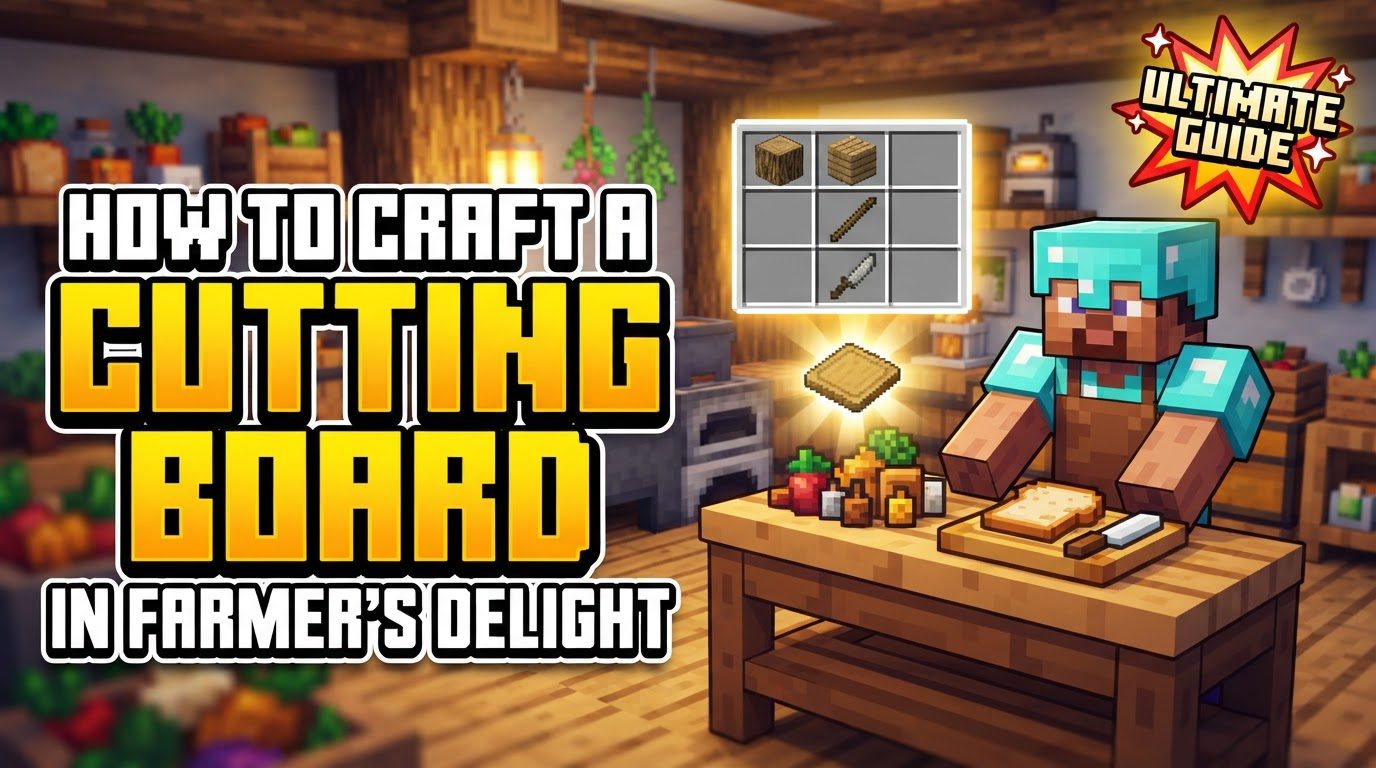
At its core, the Cutting Board is a highly versatile functional block designed primarily for processing food items and various other resources. Its impressive capability extends to supporting a staggering 125 different recipes, making it an indispensable tool for any player looking to optimize their inventory and expand their crafting possibilities. The primary function of the Cutting Board is to break down a single item into multiple distinct outputs, transforming raw ingredients or cumbersome materials into more manageable and useful forms.
Operating the Cutting Board requires the use of specific tools. Depending on the recipe, you might need a Knife, an Axe, Shears, or even a Trident. This tool-specific interaction adds a layer of depth to its usage, requiring players to understand which tool is appropriate for a given task. Once the correct item is placed and the appropriate tool is wielded, processing occurs instantly with a single right-click, providing immediate feedback and efficiency.
One of the distinctive features of the Cutting Board is how it handles outputs. Upon successful processing, the resulting items are swiped sideways from the board. Crucially, this happens in the direction opposite to where the board’s handle is facing. This mechanic is vital for setting up automated collection systems, as it allows for the strategic placement of hoppers or baskets to efficiently gather all processed goods without manual intervention.
It’s important to note that while highly efficient, the tools used on the Cutting Board do experience wear and tear. Each time an item is processed, the tool used consumes 1 durability point. This means that for large-scale operations, having durable tools or multiple tools on hand is advisable. For players seeking to maximize their yields from chance-based recipes, applying Fortune enchantments to their processing tools can be particularly beneficial, as it directly increases the drop chances for these specific outputs, potentially yielding more valuable resources.
The Cutting Board’s design philosophy positions it as an inexpensive and accessible early-game tool. Its minimal crafting requirements mean that players can integrate it into their base setup almost immediately, unlocking a vast array of processing recipes that would otherwise be unavailable. This early accessibility makes it essential for kickstarting culinary adventures, such as cutting various meats and slicing vegetables, and for efficient resource recovery, like breaking down armor into leather or converting doors back into planks.
Crafting the Cutting Board
Crafting a Cutting Board is a straightforward process, reflecting its early-game utility and accessibility. The recipe is simple, requiring only two common resources that are readily available to even the newest player in a Minecraft world.
- Ingredients:
- 4 x Planks (any type)
- 1 x Stick
- Crafting Grid Arrangement:
To craft the Cutting Board, you will need to open a crafting table. Arrange the ingredients as follows:
- Place the 4 Planks in a 2×2 square in the crafting grid. For example, fill the top-left, top-right, middle-left, and middle-right slots with planks. Alternatively, you can think of it as filling the top two rows, leaving the bottom row open.
- Place the single Stick directly below the planks, in the center slot of the bottom row.
This configuration will yield one Cutting Board. The use of “any type” of planks means you can use Oak, Spruce, Birch, Jungle, Acacia, Dark Oak, Crimson, or Warped Planks interchangeably, providing flexibility based on your available resources.
This simple recipe ensures that the Cutting Board can become a cornerstone of your early-game base, providing immediate access to its many processing capabilities without requiring extensive exploration or advanced resource gathering.
Using the Cutting Board: A Step-by-Step Guide
Operating the Cutting Board is an intuitive process designed for efficiency. Understanding each step ensures smooth and effective processing of your items.
- Placing an Item:
- To begin, select the item you wish to process and hold it in your main hand.
- Right-click directly on the Cutting Board with the item in hand.
- The item will then appear visually on the surface of the board, providing clear feedback that it has been successfully placed.
- It is crucial to remember that the Cutting Board can only hold and process one item at a time. If an item is already on the board, you cannot place another until the first is processed or retrieved.
- Processing with a Tool:
- Once the desired item is on the board, switch to the appropriate tool required for its recipe. This could be a Knife, an Axe, Shears, or a Trident, depending on what you are trying to craft.
- With the correct tool in your main hand, right-click on the Cutting Board again.
- The item will be instantly processed, and the resulting outputs will appear.
- The tool used will consume 1 durability point per processed item, so keep an eye on your tool’s health, especially during bulk operations.
- Collecting Results:
- Immediately after processing, the output items will be “swiped” sideways from the board. This specific direction is always opposite to the board’s handle.
- These items will then become collectible, either manually by walking over them or automatically by a nearby hopper or basket.
- Retrieving an Item (without processing):
- If you have placed an item on the Cutting Board but decide not to process it, or if you placed the wrong item, you can easily retrieve it.
- Simply right-click on the Cutting Board with an empty hand. The item will be returned to your inventory.
Advanced Mechanics and Important Tips
Beyond its basic functionality, the Cutting Board offers several advanced uses and considerations that can enhance your gameplay experience.
- Inexpensive Early-Game Utility: The Cutting Board’s low crafting cost makes it an invaluable asset from the very start of your game. It provides immediate access to essential food preparation recipes, such as dicing vegetables or slicing meats, which are fundamental for creating more complex and nutritious meals in Farmer’s Delight. Furthermore, its ability to recover resources, like turning old armor into usable leather or deconstructing doors back into planks, offers a sustainable way to manage your inventory and reduce waste without significant investment.
- Versatility in Food and Resource Processing: The sheer breadth of its 125 recipes means the Cutting Board is not just for cooking. It’s a versatile workbench for resource management. From preparing ingredients for advanced culinary dishes to breaking down various blocks and items for their component parts, its utility is extensive. This dual role makes it a central piece of equipment for both aspiring chefs and efficient resource gatherers.
- Automation Potential: For players looking to scale up their operations, the Cutting Board is fully compatible with Redstone automation.
- Item Input: Dispensers can be used to place items onto the Cutting Board. When powered by a Redstone signal, a dispenser facing the board will automatically place the item from its inventory onto the board’s surface.
- Tool Usage: Another dispenser can be configured to hold the necessary tool (Knife, Axe, Shears, or Trident). When this dispenser is powered by Redstone, it will simulate a right-click action on the Cutting Board, effectively processing the item. This allows for a completely hands-free processing line.
- Output Collection: For collecting the processed outputs, Baskets are generally more efficient than standard Hoppers. While hoppers can collect items, baskets are designed to collect multiple items simultaneously and more rapidly, which is crucial when a recipe yields several different outputs or when processing items in quick succession. Positioning a basket directly where items are swiped off the board ensures maximum collection efficiency.
- Decorative Tool Display: The Cutting Board also offers an aesthetic function. You can display your prized tools on its surface. By sneaking (holding shift) and then right-clicking the Cutting Board with a tiered tool, a Trident, or Shears, you can “carve” or display that tool on the board. This is a neat way to show off your best implements. However, it’s important to note a functional consequence: a Cutting Board with a carved tool displayed on it cannot be used for processing until that tool is removed. To remove a displayed tool, simply right-click the board with an empty hand.
- Fortune Enchantment Benefits: As mentioned, tools enchanted with Fortune can significantly impact the yield of chance-based recipes. For any recipe that has a probability-based output (e.g., a chance to drop an extra item), Fortune enchantments on the processing tool will increase the likelihood of those extra drops, maximizing your resource acquisition.
Common Mistakes to Avoid
While the Cutting Board is user-friendly, certain mistakes can lead to frustration. Being aware of these common issues can save you time and resources.
- Using the Wrong Tool for a Recipe: This is perhaps the most frequent error. Each of the 125 recipes supported by the Cutting Board requires a specific tool type (Knife, Axe, Shears, or Trident). Attempting to process an item with an incorrect tool will not only fail to yield any results but will also typically display an error message, informing you that the tool is unsuitable for that particular recipe. Always double-check the recipe requirements to ensure you are using the correct implement.
- Item Placement Priority Issues: When holding items in both your main hand and off-hand, there can sometimes be an unexpected interaction when placing items on the Cutting Board. If the item in your off-hand is also placeable on the board, the game might prioritize placing the off-hand item instead of the intended food or resource from your main hand. To avoid this, ensure your off-hand is empty or contains an item that cannot be placed on the Cutting Board when you intend to place an item from your main hand. This simple precaution ensures the correct item is always processed.
- Troubleshooting Item Placement: If you find that items are consistently not being placed on the Cutting Board, despite following the correct procedure, it might indicate a deeper issue. While Farmer’s Delight is generally robust, mod conflicts can sometimes interfere with its functionality. If you are playing in a modpack or with many other mods, consider checking for known mod conflicts or specific modpack issues that might be affecting the Cutting Board’s interaction. Consulting the mod’s documentation or community forums can often provide solutions for such rare occurrences.
By understanding these mechanics, tips, and potential pitfalls, you can effectively integrate the Cutting Board into your Minecraft experience, elevating your culinary creations and streamlining your resource management with Farmer’s Delight.
Tags:
YOU MAY ALSO LIKE...