

Gigabyte A520I AC Motherboard Schematic
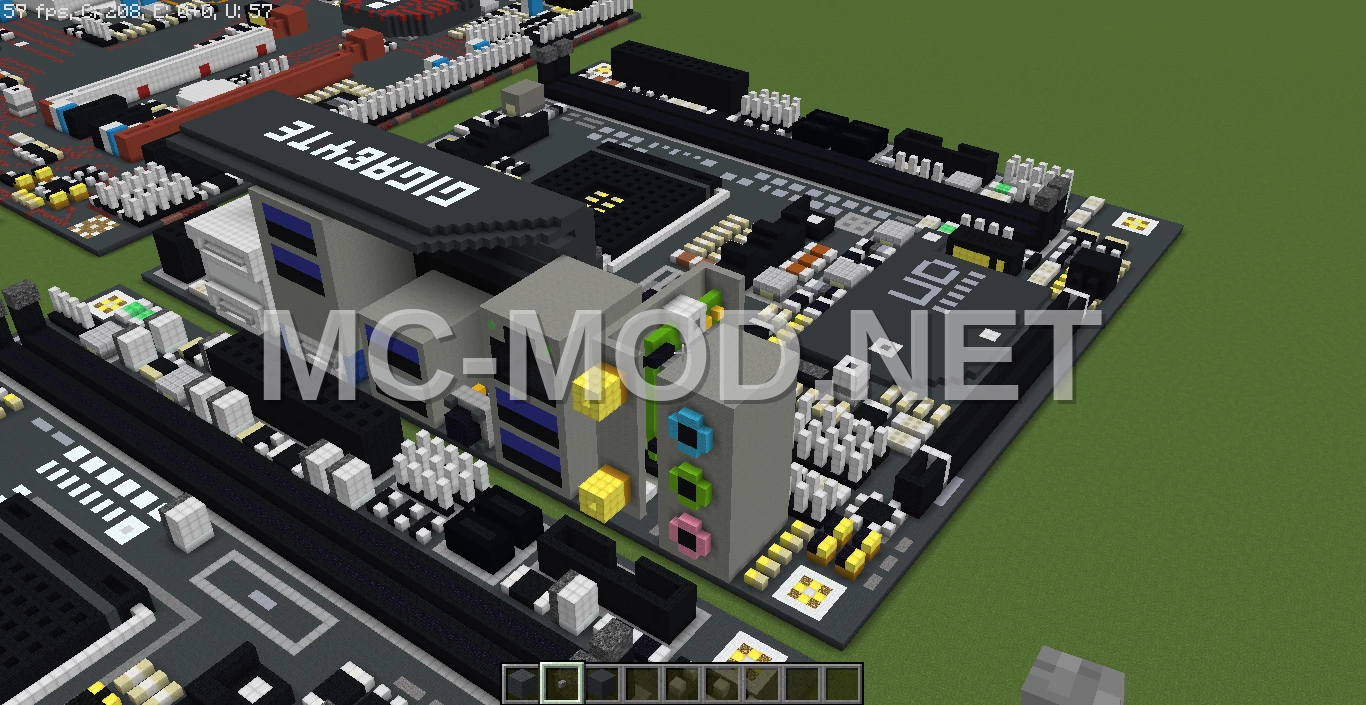


3D Preview
Drag to rotate · scroll to zoom.
| Category | Pixel Art |
|---|---|
| Theme | Other |
| Author | MatthewStevenGo |
| Format | .schematic |
| Size | Medium |
This is a schematic representation of the recently released Gigabyte A520I AC motherboard. It was constructed in under an hour, driven by a desire to utilize the opportunity to build this new hardware. The schematic was created using MCEdit version 0.1.7.1 and rendered in Minecraft version 1.12.2.
Materials Required
46 block types · 35,616 blocks · 96×24×104
Before You Build
This build uses 35,616 blocks across 46 block types – about 557 stacks in total, or 21 shulker boxes worth of material. It occupies 96×104 blocks of ground and stands 24 blocks tall.
What to bring first
Survival or creative?
This build is not survival-obtainable as-is. It contains Bedrock, which cannot be collected in survival – paste it in creative, or substitute those blocks.
How to Place It:
Moving parts
It includes Redstone Block, Slime Block, so check the mechanism still works after pasting – redstone state and item-container contents do not always survive a paste.
More Pixel Art schematics
 Gengar Pokemon Large Statue
 Giant Berta Logo Lettering
 Giant Chicken House
 Giant Chicken Sculpture – White Wool
 Giant Creeper Pixel Art
 Giant Diamond Sword Pixel Art
 Giant Flareon Pixel Art Sculpture
 Giant Iron Sword