Everything About Structure Block Orientation Mechanics
The seemingly simple interface of a Minecraft structure block hides a powerful truth: with just a few clicks, you can completely transform the orientation of your saved builds, flipping them horizontally or spinning them on their axis. Mastering these orientation mechanics unlocks unparalleled creative freedom and efficiency in your world-building endeavors.
Understanding the Core Principles of Structure Orientation
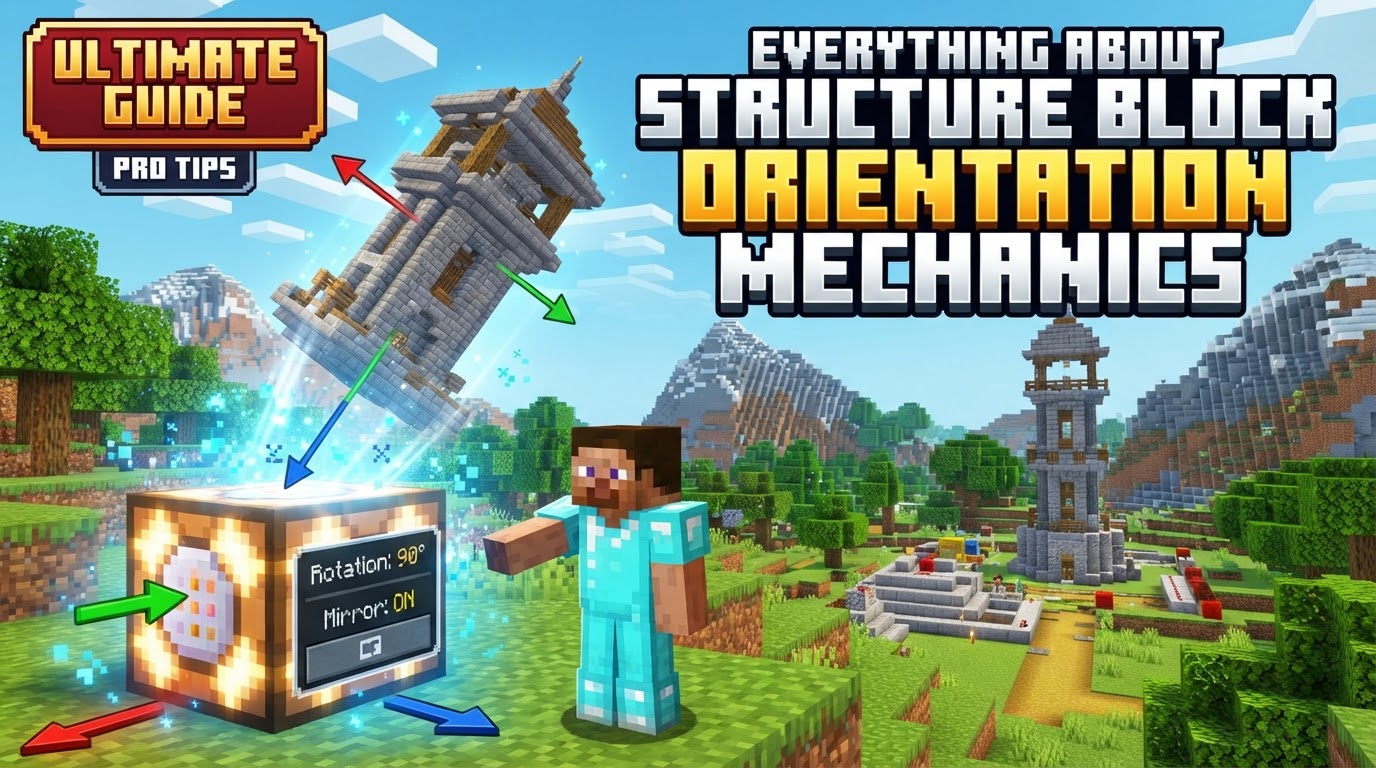
At its heart, manipulating a structure’s orientation involves two primary actions: rotation and mirroring. These settings are not merely cosmetic; they fundamentally alter how a saved collection of blocks and entities is re-rendered into the world. All configuration for these powerful tools occurs within the structure block’s graphical user interface (GUI) specifically when it is in “Load” mode.
The Four Degrees of Rotation
Structure blocks provide precise control over rotational changes, offering four distinct options:
- 0° (No Rotation): The structure loads exactly as it was saved, maintaining its original front-back and left-right alignment.
- 90° Clockwise: The entire structure is rotated 90 degrees clockwise around its vertical axis.
- 180° Clockwise: The structure is rotated a full 180 degrees, effectively facing the opposite direction from its saved orientation.
- 270° Clockwise: Equivalent to a 90-degree counter-clockwise rotation, this spins the structure three-quarters of the way around.
Each rotation pivots the structure around its defined origin point, which is crucial for predicting its final placement. Visualizing these rotations with respect to the structure block’s own axes (X for red, Y for green, Z for blue) can greatly assist in predicting the outcome.
Mastering Mirroring Options
Beyond rotation, structure blocks offer mirroring capabilities, allowing you to create symmetrical or inverted versions of your builds:
- None: No mirroring is applied; the structure loads as is.
- Left to Right (“): This option reflects the structure across a specific axis. Crucially, when the structure is at 0° rotation, “left to right” mirroring performs a reflection across the X-axis.
- Front to Back (`^v`): Similar to left-to-right, this option also reflects the structure. At 0° rotation, “front to back” mirroring reflects across the Z-axis.
It’s vital to remember the context of the 0° rotation when considering the mirroring axes. As rotations are applied, the effective “left-to-right” or “front-to-back” changes relative to the structure’s new orientation, but the underlying axis of reflection (X or Z) remains constant relative to the world coordinates of the structure block itself.
The Significance of the Origin Point
Every saved structure has an inherent “origin point” that dictates how it interacts with rotations and mirroring. This origin is determined by the most negative X, Y, and Z coordinates within the structure’s bounding box when it was saved. By default, the structure will then extend into the positive X, Y, and Z directions from this origin.
The “front” of a saved structure is visually indicated by a blue line in the structure block’s visualization. When you load a structure, this blue line will align with the front of the loading structure block. Understanding this origin and extension direction is paramount for anticipating how rotations and mirroring will affect the structure’s final loaded position and alignment.
Special Considerations for Multi-Block Structures
While structure blocks are incredibly versatile, certain block types require specific attention when rotated. Horizontal multi-blocks, such as beds or doors, are notorious for breaking or failing to orient correctly if they lack particular properties. For these blocks to respect rotation commands, they must possess the `minecraft:placement_direction` trait and have the `minecraft:cardinal_direction` state defined. Without these essential attributes, they may not rotate as intended, potentially leading to incomplete or broken structures upon loading.
Step-by-Step: Loading Structures with Custom Orientation
Applying these orientation mechanics is a straightforward process once you understand the steps:
- Save Your Structure: Begin by using “Save” and “Corner” mode structure blocks to define the boundaries of your desired build. Give it a unique and memorable name.
- Place a Load Block: Position a new structure block in the exact location where you wish to load your saved structure. This block will act as the anchor for the loading process.
- Access Load Settings: Open the placed structure block’s GUI. Change its mode to “Load” and accurately type the name of your saved structure into the designated field.
- Select Orientation: Within the load block’s GUI, locate the rotation and mirroring options. Choose your desired rotation (0°, 90°, 180°, or 270°) and/or mirroring option (none, left to right, or front to back).
- Adjust Relative Position (If Needed): This is a critical step. Because the structure rotates around its internal origin, and that origin’s position relative to your loading block may change, you often need to modify the “Relative Position” coordinates in the GUI. This ensures the rotated or mirrored structure loads precisely where you intend it to be, compensating for any shift caused by the orientation change.
- Load Structure: After confirming all settings, click the “Load” button. Your structure will appear, transformed according to your specified orientation settings.
Essential Tips for Successful Structure Orientation
- Familiarize Yourself with Axes: The X (red), Y (green), and Z (blue) axes shown by the structure block’s visualization are your best friends. Understanding which direction each axis points will help you predict the outcome of rotations and mirroring more accurately.
- Embrace Experimentation: If the loaded structure doesn’t appear as expected, don’t be discouraged. The best way to learn is by trying different rotation and mirroring combinations until you achieve the desired result. Make small adjustments and observe the changes.
- Creative Mode is Your Domain: Remember that structure blocks are administrative tools. They can only be configured and edited while you are in Creative mode. They are not intended for survival gameplay.
- Mirror Entities Too: The power of structure blocks isn’t limited to just blocks. They are also capable of mirroring and rotating entities (such as mobs, item frames, or armor stands) that are contained within the saved structure, adding another layer of complexity and utility.
Common Pitfalls to Avoid
Even experienced builders can stumble when dealing with orientation. Being aware of these common mistakes can save you time and frustration:
- Misjudging Orientation: A frequent error is failing to accurately predict how the chosen rotation and mirroring options will transform the structure relative to its original saved state. This often stems from not fully grasping the origin point’s role or the mirroring axes.
- Neglecting Relative Position Adjustment: Perhaps the most common mistake is forgetting to adjust the “Relative Position” coordinates after applying rotations or mirroring. This oversight can cause the structure to load in an unintended, offset location, forcing you to undo and re-load.
- Problematic Multi-Blocks: Encountering issues with horizontal multi-blocks (like beds or doors) that don’t rotate correctly is common. This is almost always due to the absence of the `minecraft:placement_direction` trait or the `minecraft:cardinal_direction` state, causing them to break upon loading.
- Lack of Initial Reference: Not making a mental or physical note of the initial orientation of your structure when it was first saved can make it incredibly challenging to apply precise rotations and mirroring later on. Always have a clear understanding of your structure’s “front” and “back” in its original state.
Mastering structure block orientation mechanics transforms them from simple copy-paste tools into dynamic instruments for complex world design. By understanding rotations, mirroring, the critical origin point, and the nuances of multi-block structures, you gain the power to precisely place and manipulate your builds, making your Minecraft constructions more efficient and imaginative than ever before.
Tags:
YOU MAY ALSO LIKE...