Crafting Storage Drawers for Compact Item Storage, Explained
Understanding Storage Drawers: A Modern Storage Solution
Minecraft, at its core, is a game of creation and management. As players progress, the sheer volume of items collected often overwhelms traditional storage solutions like chests. This is where Storage Drawers come into play, offering a highly efficient and compact alternative for organizing vast quantities of resources. Storage Drawers are designed to store large quantities of a single item type per drawer, revolutionizing inventory management within your base.
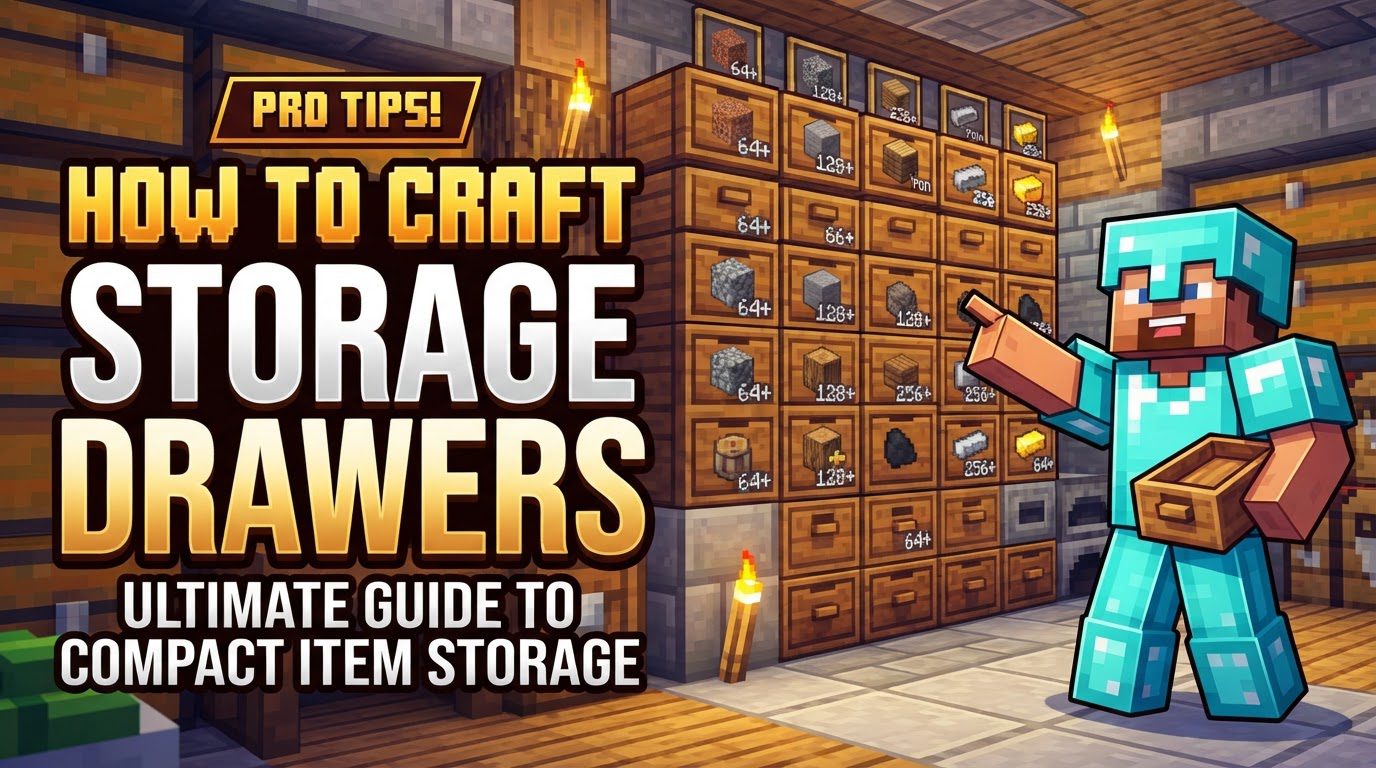
The core philosophy behind Storage Drawers is simplicity and specialization. Unlike chests that can hold many different item types in limited stacks, a Storage Drawer is dedicated to one or a few item types, but with significantly increased capacity. This specialization allows for incredibly compact storage setups, freeing up valuable space in your builds. Interaction with these drawers is intuitive and click-based: a right-click inserts a full stack of compatible items from your inventory, while a double-right-click will deposit all compatible stacks. To retrieve items, a left-click removes a single item, and a Shift + left-click extracts a full stack. This streamlined interaction makes item management swift and efficient.
Storage Drawers come in various configurations to suit different needs. These include single-slot drawers (1×1), dual-slot drawers (1×2), and quad-slot drawers (2×2). Each configuration offers different capacities and levels of compactness. For instance, a 1×1 drawer can hold an impressive 32 stacks of one item, while a 1×2 holds 16 stacks for each of its two item types, and a 2×2 holds 8 stacks for each of its four item types. There are also half-size drawers available, which, as their name suggests, hold half the capacity of their full-sized counterparts. This variety ensures flexibility in designing your storage system.
A particularly powerful feature is the Compacting Drawer. These specialized drawers automatically convert items with compressed recipes, such as ingots, blocks, and nuggets. For example, if you deposit iron ingots, a compacting drawer will automatically convert them into iron blocks when capacity allows, and vice versa. This seamless conversion means you can always access any form of the item, whether you need a block for building or nuggets for crafting, without manual intervention.
To truly unify your storage system, the Drawer Controller is indispensable. This block acts as a central hub, connecting to nearby drawers within a configurable range (typically 50 blocks or a 12x12x12 block radius). By interacting with the Drawer Controller, you gain access to the entire network of linked drawers, enabling unified inventory management for automation and easy access. This means you can deposit or retrieve items from any connected drawer through a single point.
Drawers can also be enhanced through various upgrades. These upgrades allow you to increase storage capacity, void excess items, convert items, emit Redstone signals, and even add visual fill bars to monitor stock levels at a glance. Furthermore, drawers can be locked using a Drawer Key. Locking a drawer maintains its item association even when it’s empty, preventing other items from accidentally filling it. This is a crucial feature for maintaining organization and for automated sorting systems.
Crafting Your Storage Drawer System
Building a robust storage system with Storage Drawers begins with crafting the basic components. The process is straightforward, allowing you to quickly get started on organizing your world.
Basic Drawers
To craft a basic drawer, you will need eight planks of any wood type and a Chest. Arrange the eight planks around the Chest in a crafting table. The specific wood type you use for the planks will determine the aesthetic appearance of the resulting drawer, allowing you to match them to your base’s decor. Once crafted, you can place these drawers and begin filling them.
Drawer Types
As mentioned, Storage Drawers offer different configurations to best suit your storage needs:
- 1×1 Drawers: These are ideal for storing large quantities of a single item type, boasting a capacity of 32 stacks.
- 1×2 Drawers: Designed for two different item types, each slot in a 1×2 drawer can hold 16 stacks of its respective item.
- 2×2 Drawers: For those needing to store four different item types in a compact space, the 2×2 drawer provides 8 stacks of capacity per item type.
- Half-Drawers: These variants of the above types offer half the capacity, perfect for situations where space is extremely limited or you don’t need maximum storage for a particular item.
Upgrade Templates and Storage Upgrades
To significantly boost the capacity of your drawers, you’ll need to craft and apply Storage Upgrades. The first step in this process is creating Upgrade Templates, which are typically crafted using sticks and a basic drawer. These templates serve as the base for all other upgrades.
Once you have Upgrade Templates, you can craft various Storage Upgrades. These upgrades multiply a drawer’s storage capacity:
- Tier 1 (Obsidian): Increases capacity by 2x.
- Tier 2 (Iron): Increases capacity by 4x.
- Tier 3 (Gold): Increases capacity by 8x.
- Tier 4 (Diamonds): Increases capacity by 16x.
- Tier 5 (Emeralds): Increases capacity by 32x.
An important note is that you do not need to craft these upgrades in sequence. You can directly craft and apply the highest tier available to you, instantly upgrading a drawer’s capacity to the desired level. For example, if you have diamonds, you can immediately craft a Tier 4 upgrade without needing to make Tier 1, 2, or 3 first.
Drawer Controller
The Drawer Controller is the brain of your Storage Drawer network. While recipes can vary by modpack, they commonly involve diamonds, stone comparators, and a basic drawer. The Drawer Controller is essential for creating a unified storage system, allowing you to manage multiple drawers from a single access point.
Compacting Drawers
Compacting Drawers are a specialized type of drawer that automatically handles items with compressed forms (e.g., ingots, blocks, nuggets). They are typically crafted using stone and have a distinct visual appearance to differentiate them from standard drawers. These are invaluable for managing common resources like iron, gold, and Redstone.
Important Tips for Effective Storage Drawer Use
Maximizing the benefits of Storage Drawers involves understanding and applying several key strategies:
- Centralize with a Drawer Controller: Always use a Drawer Controller as the centerpiece of your storage system. This allows you to access all linked drawers from a single point, making item deposit and retrieval incredibly easy and efficient for both manual and automated setups.
- Leverage Compacting Drawers: For any resources that have block, ingot, and nugget forms (such as iron, gold, copper, Redstone, etc.), utilize Compacting Drawers. They automatically handle the conversion between these forms, eliminating the need for separate crafting steps or dedicated storage for each variant.
- Implement the Void Upgrade for Excess Items: In automated farms that produce large quantities of items, especially those with byproducts, the Void Upgrade is critical. Applying this upgrade to a drawer will cause any items deposited beyond its capacity to be deleted, preventing your storage system from overflowing with unwanted materials.
- Lock Drawers for Reservation: Use a Drawer Key to lock drawers. This reserves them for a specific item, even if they become completely empty. This is an essential practice for automated sorting systems, ensuring that items always go to their designated drawer and preventing other items from accidentally taking their place.
- Consider the Concealment Key: For large storage rooms with many drawers, the visual display of item labels can sometimes impact performance. The Concealment Key can be used to hide these item labels, potentially improving game performance, especially in older or less powerful systems.
- Utilize Trim Blocks for Flexible Layouts: Trim blocks are useful for connecting drawers within a controller network without needing to place an actual drawer in every space. This offers greater flexibility in designing aesthetically pleasing and functional storage layouts while maintaining network connectivity.
Common Mistakes to Avoid
While Storage Drawers are powerful, certain pitfalls can hinder their effectiveness:
- Neglecting the Drawer Controller: One of the biggest mistakes is not using a Drawer Controller or linking tools. Without a centralized controller, you lose the primary benefit of a unified storage system, forcing you to interact with each drawer individually, which defeats the purpose of compact and integrated storage.
- Ignoring Upgrades: Failing to use storage upgrades significantly limits the capacity of your drawers. Without upgrades, drawers offer only a fraction of their potential storage, negating a core advantage of the mod – its ability to store vast quantities in a small footprint. Always aim to apply the highest tier storage upgrades you can afford.
- Incorrect Automation Setup: When integrating Storage Drawers into automated systems (e.g., with pipes, hoppers, or other item transport mods), ensure that these systems are properly configured to interact with the Drawer Controller or individual drawers. Incorrect setup can lead to items getting stuck, going to the wrong place, or not being deposited at all.
- Overlooking the Void Upgrade in Automated Farms: In any automated farm that generates items continuously, not having a Void Upgrade can lead to massive overflow issues. Without it, excess items will fill your system, potentially clogging transport pipes or preventing other items from being stored.
- Handling Old Version Bugs: Be aware of potential bugs in older versions of Minecraft (e.g., 1.12.2). A known issue in some older versions could cause locked drawers to remain item-associated even after being emptied and unlocked. The common fix for this specific bug involves placing the drawer, putting the item back in, and then taking it out again to reset its state. Always check for version-specific quirks if you encounter unexpected behavior.
By understanding these mechanics, crafting procedures, and best practices, you can effectively implement Storage Drawers to create a highly organized, efficient, and compact storage system in your Minecraft world.
Tags:
YOU MAY ALSO LIKE...